Components
NICE Toolbox incorporates a growing set of Computer Vision algorithms to track and identify important visual components of nonverbal communication.
This document first introduces the toolbox’s output files and then details the detected components.
Output files
The output of each component is saved in the corresponding component folder as an <algorithm_name>.npz file. Additionally, if the save_csv parameter is set to true in the ./configs/detectors_run_file.toml file, the outputs will also be saved in the csv_files folder as separate CSV files. For both file formats, the results for different algorithms are provided separately.
Numpy arrays (Video based components output format)
Per component, each <algorithm>.npz file contains several numpy arrays plus a dictionary called data_description.
component |
contained numpy arrays |
|---|---|
body_joints |
2d, 2d_filtered, 2d_interpolated, bbox_2d, 3d |
body_joints_local |
3d (camera-native or root-relative, depending on algorithm) |
body_mesh |
faces, vertices |
hand_joints |
2d, 2d_filtered, 2d_interpolated, bbox_2d, 3d |
face_landmarks |
2d, 2d_filtered, 2d_interpolated, bbox_2d, 3d |
gaze_individual |
landmarks_2d, 3d |
gaze_multiview |
gaze_2d, gaze_2d_filtered, gaze_fused, gaze_fused_filtered |
gaze_interaction |
distance_gaze_2d/3d, gaze_look_at_2d/3d, gaze_mutual_2d/3d |
kinematics |
displacement_vector_body_2d, velocity_body_2d, displacement_vector_body_3d, velocity_body_3d |
proximity |
body_distance_2d, body_distance_3d |
emotion_individual |
faceboxes, aus, emotions, poses |
All these numpy arrays share a common structure: the first 3 dimensions contain the subjects, cameras, and frames, the remaining dimensions vary with the respective entity.
Json files (Audio based components output format)
Per component, the <algorithm_name>.json file contains the output of the audio related components. These JSON files generally list results per audio track. Specifically for the speaker_aligned_transcription component output, the structure is always fixed as follows:
{
    "track_name": {
        "total": {
            "text": "full concatenated transcription text for the track",
            "start": "start_time_of_first_segment",
            "end": "end_time_of_last_segment"
        },
        "segments": [
            {
                "start": "segment_start_time",
                "end": "segment_end_time",
                "text": "segment_transcription_text",
                "avg_logprob": "segment_avg_log_probability"
            },
            // next segment ...
        ],
        "word_segments": [
            {
                "word": "word_text",
                "start": "word_start_time",
                "end": "word_end_time",
                "score": "word_log_probability_score",
                "speaker": "speaker_label"
            },
            // next word segment ...
        ],
        "language": "detected_language"
    },
    // next track ...
}
Data description
The data_description dictionary details the entries of all numpy files within on component’s algorithm .npz file. axis0 contains the subject descriptions, axis1 the camera names or ‘3d’, and axis2 the frame numbers as a zero-padded 9-digit string. The remaining axis may take the following data:
array name |
|
|
|---|---|---|
2d, 2d_filtered, 2d_interpolated |
list of all joint names |
coordinate_x, coordinate_y, confidence_score |
3d, displacement_vector_body_2d, displacement_vector_body_3d |
list of all joint names |
coordinate_x, coordinate_y, coordinate_z |
3d, gaze_fused, gaze_fused_filtered |
coordinate_x, coordinate_y, coordinate_z |
– |
gaze_2d, gaze_2d_filtered |
coordinate_u, coordinate_v |
– |
bbox_2d |
full_body |
top_left_x, top_left_y, bottom_right_x, bottom_right_y, confidence_score |
landmarks_2d |
list of all landmarks |
coordinate_u, coordinate_v |
distance_gaze_3d |
per subject: to_face_<subject_name> |
– |
gaze_look_at_3d |
per subject: look_at_<subject_name> |
– |
gaze_mutual_3d |
per subject: with_<subject_name> |
– |
velocity_body_2d, velocity_body_3d |
list of all joint names |
velocity |
body_angle_2d, body_angle_3d |
angle_deg, gradient_angle |
– |
body_distance_2d, body_distance_3d |
distance |
– |
faceboxes |
FaceRectX, FaceRectY, FaceRectWidth, FaceRectHeight, FaceScore |
– |
aus |
list of action unit IDs |
– |
emotions |
anger, disgust, fear, happiness, sadness, surprise, neutral |
– |
poses |
Pitch, Roll, Yaw |
– |
head_orientation |
start_x, start_y, end_x, end_y, confidence |
– |
Python code
The code snippet below shows how you can access the content of an .npz file in Python:
import numpy as np

# load the file
arr = np.load("path/to/file.npz", allow_pickle=True)

# to see all arrays and dictionaries inside
print(arr.files)

# arrays can be accessed as usual
print(arr['3d'].shape)
print(arr['3d'][:, 0])

# there is always a dictionary describing all available arrays and what to find in each their dimensions
print(arr['data_description'].item())

# array axis descriptions for array '3d':
print(arr['data_description'].item()['3d'])
Body joints
Identifies and tracks the position of key body joints, (e.g., shoulders, elbows) to analyze body posture and movements. Available algorithms are HRNet-w48, ViTPose / ViTPose-Huge, and RTMPose variants. The figure below illustrates the key body joints identified. ViTPose estimates full-body joints, including arms, shoulders, hips, wrists, and ankles, but excludes foot-specific joints like heels and toes. HRNet-w48 includes these additional foot joints.
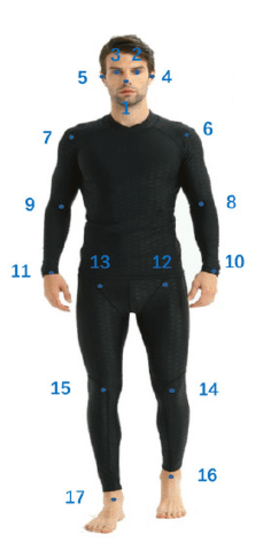
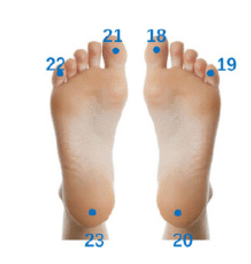
The CSV files containing the <body_joints> key and the <output_folder>/body_joints/<algorithm_name>.npz file represent the results of this component.
The algorithms estimate the position of joints in 2D (x and y coordinates) along with a confidence score for each joint. The …_2d.csv files and 2d.npy data is saved inside the <output_folder>/body_joints/<algorithm_name>.npz file represent the raw output of the algorithm. These 2D estimates are further refined during post-processing.
The algorithm’s results are smoothed in post-processing using Savitzky-Golay filter (see …_2d_filtered.csv or 2d_filtered.npy file). This smoothing helps mitigate the well-known flickering issue in pose estimation but may also smooth out small, meaningful movement changes. Filtering is optional and users can deactivate or fine-tune its parameters (see frameworks.mmpose.filtered, frameworks.mmpose.window_length, and frameworks.mmpose.polyorder parameters in the ./configs/detectors_config.toml file.
Joint estimations with a confidence score below 0.60 are marked as missing because they often indicate an occluded joint or an incorrect estimate. These likely incorrect estimations are replaced with missing values, and linear interpolation is applied between the last two non-missing estimates of the joint. If the gap exceeds 1/3 of a second, the joint positions remain empty (see …_2d_interpolated.csv or 2d_interpolated.npy file).
With calibrated stereo cameras, the 3D positions (x, y, and z coordinates) of the body joints are computed via the triangulation method (see ..._3d.csv or 3d.npy file). Since 3D estimation is performed after interpolation of the 2D estimations, any missing 2D joint point will also be missing in the 3D results.
If the user has more than two camera views, the first two camera views listed in the frameworks.mmpose.camera_names parameter in the ./configs/detectors_config.toml file will be used for triangulation.
Hand joints
Tracks the positions of hand joints to analyze hand movements and gestures. Available algorithm is HRNet-w48. The figure below represents the identified hand joints.
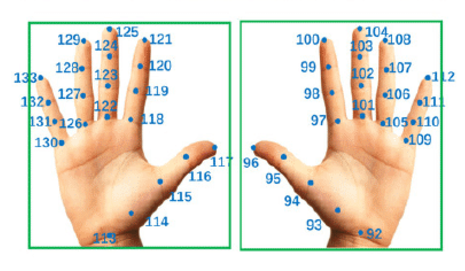
The CSV files containing the <hand_joints> key and the <output_folder>/hand_joints/<algorithm_name>.npz file represent the results of this component. The post-processing steps and naming conventions are the same as those used for body joints.
Face landmarks
Detects the position of key landmarks to analyze facial expressions and movements. Available algorithm is HRNet-w48. The figure below represents the identified face landmarks.

The CSV files containing the <face_landmarks> key and the <output_folder>/face_landmarks/<algorithm_name>.npz file represent the results of this component. The post-processing steps and naming conventions are the same as those used for body joints.
Gaze Individual
Tracks the individual’s gaze using the Multiview_eth_xgaze algorithm. The CSV files containing the <gaze_individual> key and the <output_folder>/gaze_individual/<algorithm_name>.npz file represent the results of this component.
The algorithm first detects the eye region and then calculates the 3D gaze direction. It is capable of tracking gaze in 3D space even with a single camera. When multiple cameras are used, the algorithm aggregates gaze detection results from each camera that captures the subject’s gaze.
The …_3d.csv file and 3d.npy data is saved inside the <output_folder>/gaze_individual/<algorithm_name>.npz contains the 3D gaze direction, with the starting point derived from the position of the eye. The 2D eye region positions are stored in …_landmarks_2d.csv and landmarks_2d.npy file.
Gaze direction results of the algorithm are further smoothed during post-processing using Savitzky-Golay filter (see …_3d_filtered.csv or 3d_filtered.npy file). Filtering is optional and users can deactivate or fine-tune its parameters (see algorithms.multiview_eth_xgaze.filtered, algorithms.multiview_eth_xgaze.window_length, and algorithms.multiview_eth_xgaze.polyorder parameters in the ./configs/detectors_config.toml file).
Note: Gaze individual component is currently doing fusion for the ETH-XGaze model for back compatibility reasons. We recommend using the Gaze Multiview component, which provides improved fusion methods and additional functionalities.
Gaze Multiview
Combines gaze data from multiple camera views to enhance the accuracy of gaze tracking. The CSV files containing the <gaze_multiview> key and the <output_folder>/gaze_multiv iew/<algorithm_name>.npz file represent the results of this component.
You can choose between two different fusion mechanisms: Inside the detectors configuration file (./configs/detectors_config.toml), set the algorithms.gaze_fusion.method parameter to either average or weighted_average.
The gaze-fusion algorithm integrates 3D gaze estimations from different camera views to produce a more accurate 3D gaze direction. The fused 3D gaze data is stored in the …_gaze_fused.csv and gaze_fused.npy file. Additionally, the fused gaze results are smoothed during post-processing using Savitzky-Golay filter (see …_gaze_fused_filtered.csv or gaze_fused_filtered.npy file). Filtering is optional and users can deactivate or fine-tune its parameters (see algorithms.gaze_fusion.filtered, algorithms.gaze_fusion.window_length, and algorithms.gaze_fusion.polyorder parameters in the ./configs/detectors_config.toml file).
For visualization or further analysis, the algorithm also projects the fused 3D gaze direction back into each camera view, resulting in 2D gaze coordinates per camera (see …_gaze_2d.csv and gaze_2d.npy file). These 2D projections are also smoothed during post-processing (see …_gaze_2d_filtered.csv or gaze_2d_filtered.npy file).
Gaze Interaction
Monitors the gaze interaction between dyads (mutual-gaze) to provide more insights into the communication dynamics. The CSV files containing the <gaze_interaction> key and the <output_folder>/gaze_interaction/<algorithm_name>.npz file represent the results of this component.
The gaze-distance algorithm measures the Euclidean distance between an individual’s gaze vector and the position of another person’s face (results are stored in …_distance_gaze_3d.csv and distance_gaze_3d.npy data is saved inside the <output_folder>/gaze_interaction/<algorithm_name>.npz).
If the measured distance is below a predefined threshold, the algorithm labels the gaze as directed at the other person’s face (see …_look_at_3d.csv or look_at_3d.npy file). Additionally, the algorithm detects ‘mutual gaze’ when both individuals are simultaneously looking at each other’s face (see …_gaze_mutual_3d.csv or gaze_mutual_3d.npy file).
Kinematics
The velocity-body algorithm analyzes the movement dynamics of body joints by calculating their displacement and velocity. The CSV files containing the <output_folder>/kinematics/<algorithm_name>.npz file represent the results of this component.
The displacement vectors for each body joint, calculated per camera view, are stored in the …_displacement_vector_body_2d.csv and displacement_vector_body_2d.npy data is saved inside the <output_folder>/kinematics/<algorithm_name>.npz. The velocity values, also computed per camera view, are stored in the …_velocity_body_2d.csv and velocity_body_2d.npy file.
When using calibrated stereo cameras, the algorithm computes 3D movement dynamics as well (see …_displacement_vector_body_3d.csv/displacement_vector_body_3d.npy and …_velocity_body_3d.csv/velocity_body_3d.npy).
Proximity
The body-distance algorithm measures the physical proximity between dyads by calculating between user-defined joint/s.
For each camera view, the algorithm computes this distance based on the 2D positions of the selected joints (see ...body_distance_2d.csv or body_distance_2d.npy data is saved inside the <output_folder>/proximity/<algorithm_name>.npz). With calibrated stereo cameras, the algorithm’s measurement is based on 3D position of the joint/s (see ...body_distance_3d.csv or body_distance_3d.npy file).
Emotion Detection
Utilizes Py-Feat, an open-source facial expression analysis tool, to detect facial landmarks, Action Units (AUs), and emotions from images. This module detects seven fundamental emotions: Anger, Disgust, Fear, Happiness, Sadness, Surprise, Neutral. By default, the Detector object in Py-Feat utilizes CUDA acceleration when available, ensuring faster face detection, feature extraction, and emotion classification. If a GPU is not available, processing falls back to the CPU.
Results are stored in .npz files under <output_folder>/emotion_individual/<algorithm_name>.npz. The output includes face bounding boxes (faceboxes), Action Units (AUs) (aus), emotion scores (emotions), and head pose estimation (poses).
Detector Configuration
Batch Size (
batch_size): Determines the number of images processed in each inference batch. A higher value improves efficiency but requires more RAM.Max Cores (
max_cores): Controls the number of CPU cores used for multiprocessing during inference. Set to-1to use all available cores for maximum performance.
Head Orientation
The head_orientation component uses the SPIGA algorithm to estimate the direction in which each subject’s head is pointing, as seen from different camera views. For every visible subject in each frame and view, SPIGA outputs a 2D vector representing the head pose: it begins at the estimated center of the nose and points outward in the predicted direction of the face. These vectors are computed by applying a rotation matrix (derived from the model’s estimated rotation vector) to a fixed reference vector, which is then projected onto the image plane.
The output is saved as a head_orientation array within the <output_folder>/head_orientation/<algorithm_name>.npz file. This array includes the image-plane coordinates of the nose base and nose tip for each subject, camera, and frame, along with a confidence score (currently fixed at 1.0). These estimates can be used for visualizations or further analysis of directional behavior, such as identifying shifts in attention or synchrony between individuals. Each frame is processed independently, and results are aligned with the rest of the NICE Toolbox outputs, making this component easily integrable with gaze, pose, and emotion data.
Audio Transcription
Extracts transcribed text from audio sources. The audio_transcription component converts spoken language in the audio tracks into written text. Depending on the underlying methodology, it may apply techniques like Voice Activity Detection (VAD) and forced alignment to generate highly accurate word-level or segment-level transcriptions. The intermediate outputs are saved in <output_folder>/audio_transcription/<algorithm_name>.json.
Audio Diarization
Identifies “who spoke when” within the audio sources. The audio_diarization component separates the audio stream into distinct speaker turns. It partitions the audio segments and assigns speaker labels based on the audio tracks, allowing the system to track different speakers throughout a conversation. The intermediate outputs are saved in <output_folder>/audio_diarization/<algorithm_name>.json.
Speaker Aligned Transcription
Combines transcription and diarization results into a single, fully structured format. The speaker_aligned_transcription component merges the extracted speech text with the identified speaker turns, mapping the correct speaker labels to the corresponding word or sentence segments.
The final processed output is saved in <output_folder>/speaker_aligned_transcription/<algorithm_name>.json. This component also produces extra outputs (e.g., subtitle .srt files in the detector output directory) which are utilized to bake visualizations like subtitle overlays into video files.